 isketch
Home
Open the editor
isketch
Home
Open the editor
The .flow format
Every isketch diagram can be written as plain text that reads well, diffs cleanly, and that a coding agent reads exactly — and can edit back.
Text
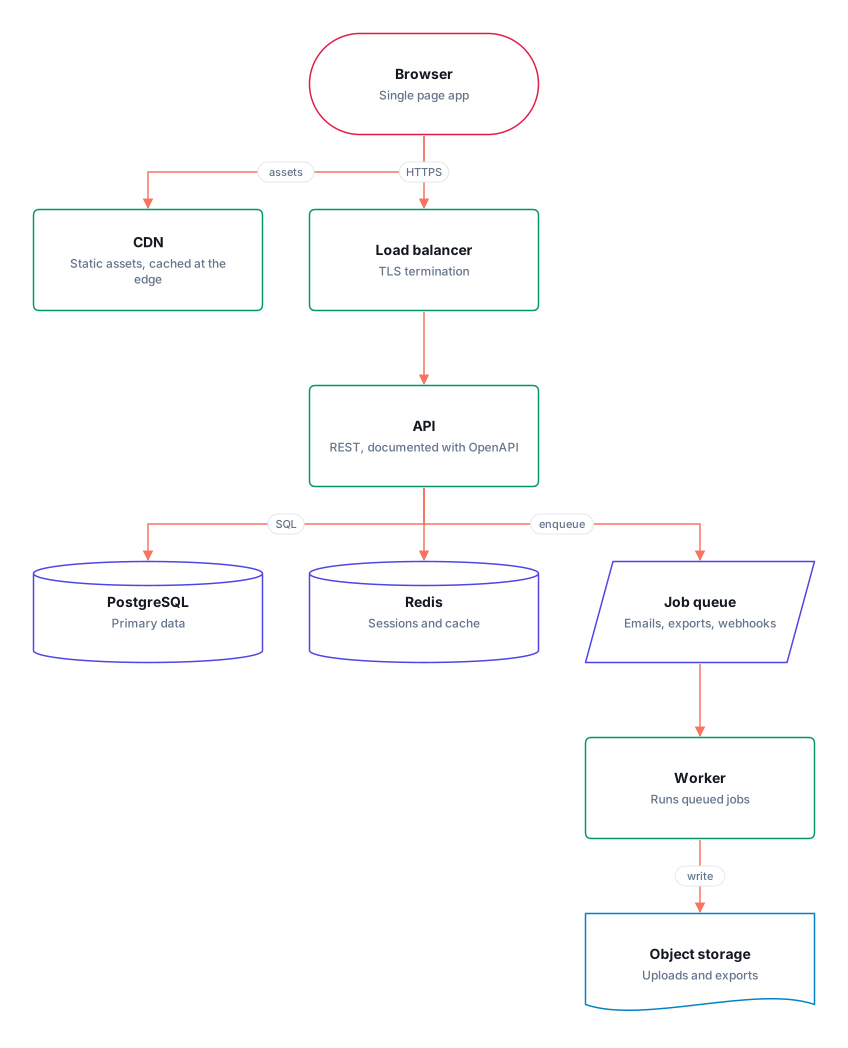
title: Web app architecture

browser = terminal "Browser" -- Single page app
cdn = process "CDN" -- Static assets, cached at the edge
lb = process "Load balancer" -- TLS termination
api = process "API" -- REST, documented with OpenAPI
queue = data "Job queue" -- Emails, exports, webhooks
db = database "PostgreSQL" -- Primary data
cache = database "Redis" -- Sessions and cache
worker = process "Worker" -- Runs queued jobs
files = document "Object storage" -- Uploads and exports

browser -> cdn : assets
browser -> lb : HTTPS
lb -> api
api -> db : SQL
api -> cache
api -> queue : enqueue
queue -> worker
worker -> files : write

@layout
browser 276,0
cdn 0,176
lb 276,176
api 276,352
queue 552,528
db 0,528
cache 276,528
worker 552,704
files 552,880
Drawn
Every rule
-
id = shape "Name" -- descriptiondeclares a node. The name and description are optional. Shapes:process,terminal,decision,data,database,document,note,table,text; for wireframesscreen,button,input,card,list,image. -
note: ...under the title is a note for the whole diagram, andid note: ...a note for one shape, one line each: instructions for whoever builds from it, person or agent. -
a -> b : labelconnects two nodes. The label is optional, and a line may refer to a node defined further down.a --> bis dashed,a <-> bhas an arrow at each end, anda <--> bis both. -
lines: curvedorlines: straightunder the title changes how every connection runs; the default is steps. -
@layoutstarts the positions, oneid x,yper line, withWxHafter it for a resized shape. A node with no position is laid out automatically, so a hand-written diagram needs no layout block at all. -
Pen strokes are
id = inkshapes, with their points in an@inkblock after the layout, so they never clutter the lines that say what the system is. -
style: sketchunder the title draws the diagram by hand. Leave it out for clean lines. -
#starts a comment. A newline inside a description or label is written\n.
A wireframe, sketched
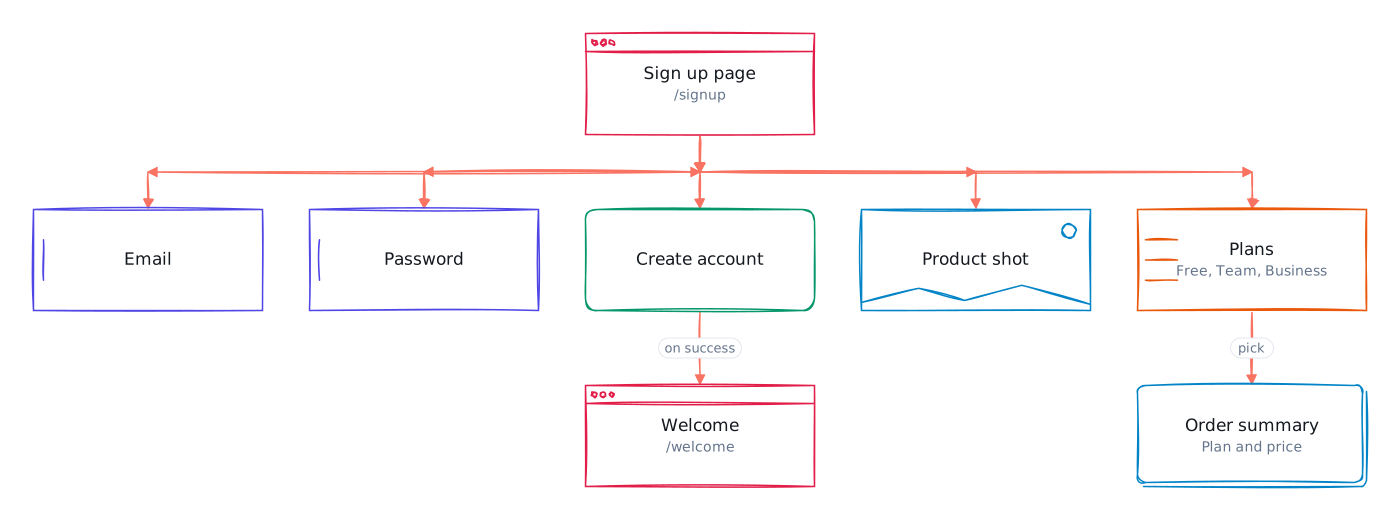
title: Sign up
style: sketch

page = screen "Sign up page" -- /signup
email = input "Email"
password = input "Password"
submit = button "Create account"
hero = image "Product shot"
plans = list "Plans" -- Free, Team, Business
summary = card "Order summary" -- Plan and price
done = screen "Welcome" -- /welcome

page -> email
page -> password
page -> submit
page -> hero
page -> plans
plans -> summary : pick
submit -> done : on success
Try it
Open the example in the editor, edit the text, and watch the drawing follow: Open this diagram